Can you write this from memory?
Declare state for `user` with initial value `null`
JavaScript React Hooks feel easy until you ship a bug caused by:
- A dependency array that changes every render (infinite loop)
- A missing dependency (stale closure / stale state)
- A missing cleanup (memory leaks, duplicate subscriptions)
- Strict Mode remounting (effects appear to run twice)
Practice here focuses on the parts that actually break: dependency arrays, cleanup timing, stale closures in effects/callbacks, and composing custom hooks correctly.
Effects are React's way to synchronize your component with something outside React: the DOM, a timer, a WebSocket, an API. They're not for orchestrating React state.
If your effect just transforms props/state into other state, you probably don't need an effect. Compute it during render instead. Understanding module scope and closures helps explain why hooks must be called at the top level.
// BAD: Effect to derive state
const [items, setItems] = useState([]);
const [filtered, setFiltered] = useState([]);

useEffect(() => {
  setFiltered(items.filter(x => x.active));
}, [items]);

// GOOD: Compute during render
const [items, setItems] = useState([]);
const filtered = items.filter(x => x.active); // No effect needed
The dependency array tells React when to re-run your effect. Get it wrong and you'll see infinite loops or stale data.
The rule
Include every value from the component scope that the effect uses:
useEffect(() => {
  fetchData(userId); // Uses userId
}, [userId]); // Must include userId
Why objects and functions cause loops
Objects and functions are compared by reference. A new object/function is created each render:
// BUG: Infinite loop because options is new every render
const options = { limit: 10 };
useEffect(() => {
  fetchData(options);
}, [options]); // options !== options (different reference)

// FIX 1: Move inside effect
useEffect(() => {
  const options = { limit: 10 };
  fetchData(options);
}, []); // No external dependency

// FIX 2: Memoize
const options = useMemo(() => ({ limit: 10 }), []);
useEffect(() => {
  fetchData(options);
}, [options]); // Stable reference now
Trust exhaustive-deps
The ESLint rule exhaustive-deps catches missing dependencies. Don't suppress it. It's almost always right:
// WARNING: React Hook useEffect has a missing dependency: 'userId'
useEffect(() => {
  fetchUser(userId);
}, []); // Missing userId = stale closure bug
If you think you need an empty array but use external values, restructure the effect or move logic elsewhere.
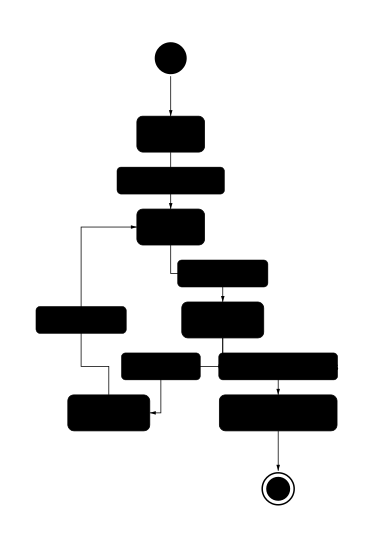
Cleanup runs:
- Before each re-run when dependencies change
- On unmount when the component leaves the DOM
useEffect(() => {
  const ws = new WebSocket(url);
  ws.onmessage = handleMessage;

  return () => ws.close(); // Cleanup
}, [url]); // When url changes: close old socket, open new one
Think of cleanup as "undoing" what setup did. This setup/teardown lifecycle mirrors the Observer design pattern, where you subscribe on mount and unsubscribe on cleanup:
| Setup does | Cleanup should |
|---|---|
| Subscribe | Unsubscribe |
| Add event listener | Remove event listener |
| Start timer | Clear timer |
| Open connection | Close connection |
If you forget cleanup, you'll get memory leaks, duplicate subscriptions, or stale handlers responding to old data.
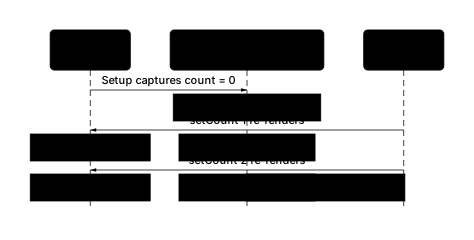
React 18+ Strict Mode intentionally runs your effects twice in development:

Why: To verify your cleanup mirrors your setup. If your app breaks with this behavior, you have a bug (usually missing cleanup).
Not a bug to fix by disabling Strict Mode. Fix the effect instead. Understanding how DOM event listeners work helps you write proper cleanup for browser APIs:
// BUG: Breaks in Strict Mode (duplicate listeners)
useEffect(() => {
  window.addEventListener('resize', handleResize);
}, []);

// FIX: Add cleanup
useEffect(() => {
  window.addEventListener('resize', handleResize);
  return () => window.removeEventListener('resize', handleResize);
}, []);
JavaScript closures capture variables by reference (see functions page for the general concept). In React, this shows up when:
- An effect captures old state/props
- A callback inside setInterval reads stale values
- An event handler uses outdated state
The setInterval trap
// BUG: Always logs 0 (stale closure)
const [count, setCount] = useState(0);

useEffect(() => {
  const id = setInterval(() => {
    console.log(count); // Captures count = 0 forever
  }, 1000);
  return () => clearInterval(id);
}, []); // Empty deps = never re-runs, count stays stale

// FIX 1: Add count to deps (restarts interval each change)
useEffect(() => {
  const id = setInterval(() => console.log(count), 1000);
  return () => clearInterval(id);
}, [count]);

// FIX 2: Use functional update (reads latest state)
useEffect(() => {
  const id = setInterval(() => {
    setCount(c => c + 1); // c is always current
  }, 1000);
  return () => clearInterval(id);
}, []);

// FIX 3: useRef for "latest value"
const countRef = useRef(count);
countRef.current = count; // Update each render

useEffect(() => {
  const id = setInterval(() => {
    console.log(countRef.current); // Always current
  }, 1000);
  return () => clearInterval(id);
}, []);
Does changing this value need to update the UI?
├── Yes → useState
└── No → useRef
useRef use cases:
- Timer/interval IDs
- DOM element references
- "Latest value" storage for callbacks
- Values that change frequently but shouldn't re-render (scroll position, animation frame)
// Storing a timeout ID (no re-render needed)
const timeoutRef = useRef(null);

// Keeping the latest callback without re-triggering effects
const onChangeRef = useRef(onChange);
onChangeRef.current = onChange;

useEffect(() => {
  const handler = () => onChangeRef.current(value);
  // handler always calls the latest onChange
}, [value]);
Before React Compiler: Manual memoization was common to prevent re-renders.
With React Compiler (v1.0+): Memoization is automatic in most cases. Manual useMemo/useCallback become escape hatches for when you need explicit control.
When you still need them:
- Stabilizing effect dependencies
- Passing callbacks to heavily memoized children
- Expensive calculations that shouldn't re-run
- External libraries requiring stable references
// Stabilize for effect dependency
const options = useMemo(() => ({ userId, limit }), [userId, limit]);

useEffect(() => {
  fetchData(options);
}, [options]); // Won't loop now
Don't over-memoize. Adding useMemo/useCallback everywhere adds complexity and can hurt performance if the memoization cost exceeds the re-render cost.
useEffect can't be async directly (it must return cleanup or undefined, not a Promise):
// WRONG: Returns a Promise
useEffect(async () => {
  const data = await fetchData();
  setData(data);
}, []);

// RIGHT: Inner async function
useEffect(() => {
  async function load() {
    const data = await fetchData();
    setData(data);
  }
  load();
}, []);

// RIGHT with cleanup (cancellation)
useEffect(() => {
  const controller = new AbortController();

  async function load() {
    try {
      const res = await fetch(url, { signal: controller.signal });
      const data = await res.json();
      setData(data);
    } catch (err) {
      if (err.name !== 'AbortError') {
        setError(err); // Don't throw or it would be unhandled
      }
    }
  }

  load();
  return () => controller.abort();
}, [url]);
For more on AbortController and async patterns, see the async/await page.
| Pattern | Code |
|---|---|
| Functional update | setState(prev => prev + 1) |
| Effect with cleanup | useEffect(() => { setup(); return cleanup; }, [deps]) |
| Latest value ref | const ref = useRef(value); ref.current = value; |
| Stable callback | useCallback(() => fn(x), [x]) |
| Memoized value | useMemo(() => compute(x), [x]) |
| Async effect | useEffect(() => { async function f() {...} f(); }, []) |
When to Use JavaScript React Hooks
- Use useState for UI state that should trigger re-renders.
- Use useRef for mutable values that must persist across renders without causing re-renders (timers, DOM nodes, "latest value" refs).
- Use useEffect to synchronize with external systems (subscriptions, imperative APIs, data fetching).
- Use useMemo/useCallback when you need stable references for effect dependencies or memoized children.
- Extract reusable stateful behavior into custom hooks.
Check Your Understanding: JavaScript React Hooks
Why can useEffect run in a loop, and what are the safest fixes?
Because something in the dependency array changes every render, often a function or object created inline. Fix by: (1) moving the logic inside the effect, (2) memoizing dependencies with useMemo/useCallback, or (3) restructuring so the effect depends only on primitive/stable values.
What You'll Practice: JavaScript React Hooks
Common JavaScript React Hooks Pitfalls
- Missing dependencies in dependency arrays (causes stale closures)
- Infinite loops from object/function deps that change every render
- Forgetting cleanup functions (memory leaks, duplicate subscriptions)
- Assuming effects run only once (Strict Mode runs setup/cleanup twice in dev)
- Doing derived state in effects when it can be computed during render
- Using async/await directly in useEffect (must wrap in inner function)
- Ignoring exhaustive-deps warnings (almost always indicates a real bug)
- Over-memoizing with useMemo/useCallback (adds complexity, often unnecessary)
JavaScript React Hooks FAQ
What are the Rules of Hooks?
Only call hooks at the top level of a function component or custom hook. Never inside loops, conditions, or nested functions. This ensures React can correctly track hook state across renders.
Why does missing a dependency cause bugs?
If you omit a value used inside an effect/memo/callback, React won't re-run when that value changes. The hook keeps reading the old (stale) value from when it was created.
Why does useEffect run twice in development?
In Strict Mode (development only), React mounts components twice to stress-test your effects and verify cleanup works correctly. If this breaks something, you likely need proper cleanup or idempotent effects.
When should I use useRef instead of useState?
Use useRef for values that should persist but shouldn't trigger UI re-renders: interval IDs, DOM nodes, animation handles, or "latest value" storage for callbacks.
How does cleanup timing work?
When dependencies change, React runs the previous cleanup first, then runs the effect with new values. Cleanup also runs on unmount. The pattern is: setup → (deps change) → cleanup → setup → ... → (unmount) → cleanup.
Should I always use useCallback/useMemo?
No. Use them when you need stable references for effect dependencies or when passing callbacks to memoized children. With React Compiler (v1.0+), memoization is automatic in most cases. Manual hooks become escape hatches for edge cases.
What does "You Might Not Need an Effect" mean?
Effects should synchronize with external systems, not orchestrate React state. If you're updating state based on props/state changes, you can often compute it during render or handle it in event handlers instead.
Why did my async effect cause a "state update on unmounted component" warning?
The component unmounted before your async operation finished. Use a cleanup function to cancel the request (AbortController) or set a flag to skip the state update.
Can I use async/await directly in useEffect?
Not directly. useEffect expects a cleanup function or undefined as its return value, not a Promise. Define an async function inside the effect and call it immediately.
What is the exhaustive-deps lint rule?
It warns when dependencies are missing from your dependency array. Missing deps cause stale closure bugs. Trust the linter: if it complains, your effect likely has a bug.
When should I use useLayoutEffect instead of useEffect?
Use useLayoutEffect when you need to measure DOM nodes or prevent visual flicker. It runs synchronously after DOM mutations but before the browser paints. For most effects (data fetching, subscriptions), useEffect is correct.
When should I use useReducer instead of useState?
Use useReducer when state logic is complex (multiple sub-values, next state depends on previous), when you want to centralize update logic, or when passing dispatch to deep children (dispatch identity is stable).
JavaScript React Hooks Syntax Quick Reference
setCount(c => c + 1); // Safe even if count is staleuseEffect(() => {
const id = setInterval(() => tick(), 1000);
return () => clearInterval(id); // Cleanup
}, [tick]);const latestCallback = useRef(callback);
latestCallback.current = callback; // Update each renderconst filtered = useMemo(
() => items.filter(x => x.active),
[items]
);const handleClick = useCallback(
() => doSomething(id),
[id]
);useEffect(() => {
let cancelled = false;
async function load() {
const data = await fetchData();
if (!cancelled) setData(data);
}
load();
return () => { cancelled = true; };
}, []);function useLocalStorage(key, initial) {
const [value, setValue] = useState(() => {
const stored = localStorage.getItem(key);
return stored ? JSON.parse(stored) : initial;
});
useEffect(() => {
localStorage.setItem(key, JSON.stringify(value));
}, [key, value]);
return [value, setValue];
}JavaScript React Hooks Sample Exercises
Import useState and useEffect from React
import { useState, useEffect } from 'react';Define a function component `UserProfile` that takes `userId` as a prop
function UserProfile({ userId }) {Initialize theme state lazily using getInitialTheme
const [theme, setTheme] = useState(getInitialTheme);+ 14 more exercises