Can you write this from memory?
Extract `name` and `age` from object `user`.
If "loops" are about control flow, JavaScript modules + scope are about structure.
Quick chooser:
- One primary thing to export? →
export default - Multiple exports / utilities? → named exports (
export const …) - Need conditional loading / code-splitting? →
import()(dynamic import) - Need block scope + predictable variables? →
constby default,letwhen reassigned - Seeing "Cannot access X before initialization"? → TDZ or cyclic import
Key facts:
- ES modules run in strict mode automatically.
- Static
importgives you read-only live bindings (not copies). - Import declarations are hoisted (but imports-at-top is still best practice).
- Cyclic imports can trigger TDZ-style runtime errors.
ES modules and scope rules work together:
- Modules control what's shared between files
- Scope controls what's visible within a file
Master both and you'll avoid the most common JavaScript structural bugs.
| Situation | Use | Why |
|---|---|---|
| Single main thing (component, class) | export default | Importing file names it |
| Multiple utilities | Named exports | Explicit imports, easier refactoring |
| Library with many functions | Named exports | Tree-shaking, discoverability |
// Single main thing → default
export default function Button() { ... }
import Button from "./Button.js";

// Multiple utilities → named
export const add = (a, b) => a + b;
export const subtract = (a, b) => a - b;
import { add, subtract } from "./math.js";
Why many teams prefer named exports:
- Import statements are explicit (you see what's imported)
- Renaming is consistent (
import { add as sum }vs mystery defaults) - Better IDE autocomplete and refactoring support
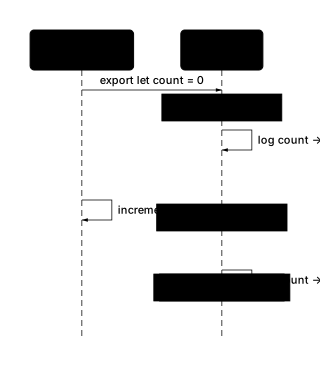
This surprises most developers:
// counter.js
export let count = 0;
export function increment() { count++; }

// main.js
import { count, increment } from "./counter.js";
console.log(count);  // 0
increment();
console.log(count);  // 1 (it updated!)
Static imports create read-only live bindings:
- The binding updates when the exporting module changes it
- You cannot reassign the import (
count = 5throws)
This enables circular dependencies to sometimes work, but it's also why they can fail mysteriously.
Static imports are hoisted and evaluated at load time. Dynamic import() is:
- Evaluated when the line executes
- Returns a Promise
- Works in non-module contexts (scripts, CommonJS)
// Conditional loading
if (needsChart) {
  const { Chart } = await import("./chart.js");
  new Chart(data);
}

// Code splitting
const routes = {
  "/dashboard": () => import("./pages/Dashboard.js"),
  "/settings": () => import("./pages/Settings.js"),
};
Use dynamic import when:
- You want code splitting (load on demand)
- Loading is conditional
- You're in a non-module context
Re-exports let you aggregate multiple modules into a single entry point:
// utils/index.js (barrel file)
export { add, subtract } from "./math.js";
export { formatDate } from "./date.js";
export { default as logger } from "./logger.js";

// Consumer imports from one place
import { add, formatDate, logger } from "./utils";
Re-export patterns:
| Pattern | Syntax |
|---|---|
| Re-export named | export { x } from "./m.js" |
| Re-export all | export * from "./m.js" |
| Re-export default as named | export { default as x } from "./m.js" |
| Re-export with rename | export { x as y } from "./m.js" |
When to use barrel files:
- Public API boundaries (expose clean interface)
- Grouping related utilities
Barrel files act as a Facade, presenting a simplified public API that hides the internal module structure from consumers.
When to avoid:
- Internal code (adds indirection)
- When tree-shaking matters (bundlers may struggle with
export *)
ES modules support await at the top level. No wrapping async function needed:
// config.js
const response = await fetch("/api/config");
export const config = await response.json();

// main.js
import { config } from "./config.js";
// config is already resolved when this runs
console.log(config.apiUrl);
How it works:
- The module pauses at the
awaituntil the Promise resolves - Any module that imports it also waits
- Creates a dependency chain for async initialization
Use cases:
- Loading configuration at startup
- Initializing database connections
- Conditional module loading based on async checks
Caution: Top-level await can slow down your app if overused. Every awaited module blocks its importers.
Unlike classic <script> tags, ES modules have their own scope:
// script tag (pollutes global)
<script>
  var name = "Alice";  // window.name = "Alice"
</script>

// ES module (isolated)
<script type="module">
  const name = "Alice";  // NOT on window
  // window.name is undefined
</script>
Why this matters:
- No accidental overwrites between scripts
- No naming collisions with libraries
- Explicit exports are the only way to share
If you need to expose something globally (rare), do it explicitly:
// Explicit global (avoid unless necessary)
window.myApp = { version: "1.0.0" };
Import declarations are hoisted, but this is different from var hoisting:
// This works because imports are hoisted
console.log(add(2, 3));  // 5
import { add } from "./math.js";

// But this is still bad style! Put imports at the top.
Key differences from var hoisting:
| Aspect | import hoisting | var hoisting |
|---|---|---|
| Value | Fully initialized | Hoists as undefined |
| Side effects | Module executes immediately | No side effects |
| Best practice | Always put at top | Avoid var entirely |
Why imports-at-top matters:
- Module side effects run when first imported, so order becomes implicit if imports are scattered
- Readability: imports at top show dependencies at a glance
- Some tools/linters require it

The TDZ is the region between entering a scope and the variable's declaration:
{
  // TDZ for `x` starts here
  console.log(x);  // ReferenceError: Cannot access 'x' before initialization
  let x = 10;      // TDZ ends here
}
Why TDZ exists: It catches bugs. Accessing a variable before declaration is almost always an error. For a quick reference of modern scope and module syntax alongside other ES6+ features, see the ES6 features cheat sheet.
What has TDZ: let, const, class
What doesn't: var (hoists as undefined), function declarations (fully hoisted)
// var hoists as undefined (no TDZ)
console.log(a);  // undefined
var a = 1;

// let/const have TDZ
console.log(b);  // ReferenceError
let b = 2;

// function declarations are fully hoisted
greet();  // Works!
function greet() { console.log("Hi"); }
Do you need to reassign it?
├── No → const
└── Yes → let

Never use var (unless legacy code requires it)
Why avoid var:
- Function-scoped, not block-scoped (leaks out of if/for blocks)
- Hoists as
undefined(masks bugs) - Can be redeclared (more bugs)
// var leaks out of blocks
if (true) {
  var leaked = "oops";
}
console.log(leaked);  // "oops" (still accessible!)

// let/const are block-scoped
if (true) {
  let contained = "safe";
}
console.log(contained);  // ReferenceError
Circular imports can work with ES modules, but they can also produce mysterious errors:
// a.js
import { b } from "./b.js";
export const a = "A";
console.log(b);  // Works if b is initialized

// b.js
import { a } from "./a.js";
export const b = "B";
console.log(a);  // ReferenceError! a isn't initialized yet
Why it fails: When b.js runs, a.js is still being evaluated. a exists (live binding) but hasn't been initialized yet (TDZ).
Fixes:
- Move shared code to a third module (both import from it)
- Use function calls instead of top-level access (delay evaluation)
- Merge the modules if they're tightly coupled
// Fix: use a function to delay access
// b.js
import { getA } from "./a.js";
export const b = "B";
console.log(getA());  // Works, called after both modules load

// a.js
export const a = "A";
export const getA = () => a;
Generators produce values on demand:
function* range(start, end) {
  for (let i = start; i < end; i++) {
    yield i;
  }
}

// Only generates values as needed
for (const n of range(0, 1000000)) {
  if (n > 5) break;  // Stops early, doesn't generate all million
}
Generator use cases:
- Lazy sequences (infinite or expensive to compute)
- Custom iterators (see functions for how closures and generators relate)
- State machines
Key syntax:
function*declares a generatoryieldpauses and returns a value- Generators return an iterator
Node.js has two module systems. To use ES modules:
Option 1: Set package type
// package.json
{ "type": "module" }
Option 2: Use file extensions
.mjs= ES module.cjs= CommonJS
Common pitfall: Mixing ESM and CommonJS requires care:
// ESM can import CommonJS
import pkg from "./commonjs-package.cjs";

// CommonJS cannot use import (use dynamic import or require)
const pkg = require("./commonjs-package.cjs");
| Pattern | Code |
|---|---|
| Named export | export const x = ... |
| Default export | export default function() {} |
| Named import | import { x } from "./m.js" |
| Default import | import x from "./m.js" |
| Rename import | import { x as y } from "./m.js" |
| Namespace import | import * as m from "./m.js" |
| Dynamic import | await import("./m.js") |
| Re-export all | export * from "./m.js" |
| Re-export named | export { x } from "./m.js" |
| Top-level await | const x = await fetch(...) |
| Generator | function* g() { yield 1; } |
When to Use JavaScript Modules & Scope
- Use named exports when a module exposes multiple utilities (clear, explicit imports).
- Use a default export when a module has one "main" thing (component/class/single function).
- Use dynamic import() when loading should be conditional or deferred.
- Use const for bindings that will not be reassigned; use let when reassignment is required.
- Use generators for lazy sequences when you want pull-based iteration.
Check Your Understanding: JavaScript Modules & Scope
Explain named vs default exports, and how you would choose between them.
Default export = one main export per file; named exports = multiple exports. I use named exports for utility modules (explicit imports, fewer "mystery defaults") and default export for a single primary module entry (like a single component or class). If I expect lots of helpers or re-exports, I prefer named to keep imports consistent.
What You'll Practice: JavaScript Modules & Scope
Common JavaScript Modules & Scope Pitfalls
- const does not mean immutable (objects can still be mutated)
- Temporal dead zone (TDZ) surprises with let/const/class
- Static imports are read-only live bindings (not copies)
- Static import declarations must be top-level; use import() for conditional loading
- Import declarations are hoisted (side effects can run earlier than you expect)
- Circular module dependencies can produce "used before initialization" errors
- var hoists to function scope and initializes as undefined (unlike let/const TDZ)
JavaScript Modules & Scope FAQ
Are ES modules strict mode?
Yes. Files interpreted as modules are automatically in strict mode. No "use strict" needed.
Are imported values copied or referenced?
Static imports are read-only live bindings: they update if the exporting module updates them, but you cannot reassign the import in the importer.
Can I import inside an if statement?
Static import declarations must be at the top level of a module. If you need conditional loading, use dynamic import(): `await import("./x.js")`.
What is the temporal dead zone (TDZ)?
Variables declared with let/const/class exist from the start of the block but are uninitialized until their declaration runs. Accessing them early throws a ReferenceError.
Does const make objects immutable?
No. const prevents reassignment of the binding, but object properties can still change unless you freeze the object.
Why do circular imports sometimes crash at runtime?
Because cyclic dependencies can cause a binding to be used before it is initialized, leading to a ReferenceError. Break the cycle by moving shared code into a third module or merging modules.
What is the difference between let, const, and var?
let and const are block-scoped and have TDZ; var is function-scoped and hoists as undefined. const prevents reassignment; let allows it. Prefer const by default, let when needed, avoid var.
How do I use ES modules in Node.js?
Either set "type": "module" in package.json, or use .mjs file extension. For CommonJS files alongside ESM, use .cjs extension.
What is top-level await?
ES modules allow await at the top level (outside any async function). The module pauses until the Promise resolves. Use it for async initialization like fetching config at startup.
Do ES modules pollute the global scope?
No. Variables declared in a module are scoped to that module, not added to window (browser) or global (Node). This is a key advantage over classic script tags.
What is a barrel file?
A barrel file (usually index.js) re-exports from multiple modules, letting consumers import from one place: `export * from "./math.js"`. Useful for public APIs, but can hurt tree-shaking if overused.
JavaScript Modules & Scope Syntax Quick Reference
export const add = (a, b) => a + b;
import { add } from "./math.js";export default function greet(name) { return `Hi ${name}`; }
import greet from "./greet.js";import { add as sum } from "./math.js";
console.log(sum(2, 3));import * as math from "./math.js";
console.log(math.add(2, 3));export * from "./math.js";
export { default as greet } from "./greet.js";const mod = await import("./heavy-lib.js");
mod.doWork();{
console.log(bar); // undefined
// console.log(foo); // ReferenceError (TDZ)
var bar = 1;
let foo = 2;
}function* range(start, end) {
for (let i = start; i < end; i++) yield i;
}
for (const n of range(0, 3)) console.log(n);// In an ES module (not a script)
const config = await fetch("/config.json").then(r => r.json());
export default config;JavaScript Modules & Scope Sample Exercises
Extract `title` from `post` but rename variable to `postTitle`.
const { title: postTitle } = post;Extract `id` with a default value of 0 from `item`.
const { id = 0 } = item;Swap variables `a` and `b` using destructuring.
[a, b] = [b, a];+ 16 more exercises