Can you write this from memory?
Create a Promise that resolves to "Success".
JavaScript's async/await makes asynchronous code look synchronous, but the rules are still Promise rules.
Remember:
- An
asyncfunction always returns a Promise awaitunwraps a Promise value, and can only appear inside an async function (or at the top level of a module)- If you see
Promise { <pending> }instead of data, you forgot anawait
Practice focuses on missing awaits, accidental serialization, Promise combinator choices, and errors that never get handled.
This single fact explains most async/await bugs:
async function getData() {
  return 42;  // Still returns Promise<42>, not 42
}

const result = getData();
console.log(result);  // Promise { 42 }, not 42!

const actual = await getData();
console.log(actual);  // 42
Rule: If a function is async, you must await it to get the value. If you see Promise { <pending> }, you forgot an await somewhere. For a printable quick reference of all async patterns, see the JavaScript async/await cheat sheet.

Sequential awaits in loops are a common performance mistake:
// SLOW: Each fetch waits for the previous one
for (const id of ids) {
  const user = await fetchUser(id);  // 1s each = 5s total for 5 users
  users.push(user);
}

// FAST: All fetches run simultaneously
const users = await Promise.all(
  ids.map(id => fetchUser(id))  // 1s total for 5 users
);
When to use sequential: Only when each iteration depends on the previous result, or you're rate-limiting intentionally.
When to use parallel: Independent operations that don't affect each other.
JavaScript has four Promise combinators. Pick the right one:
| Combinator | Returns when | Use case |
|---|---|---|
Promise.all | All fulfill (or first rejects) | Parallel fetch, fail-fast |
Promise.allSettled | All settle (fulfill or reject) | Partial success OK |
Promise.race | First settles | Timeout, first-response |
Promise.any | First fulfills (or all reject) | First success wins |
Promise.all: fail-fast parallelism
try {
  const [user, posts, settings] = await Promise.all([
    fetchUser(id),
    fetchPosts(id),
    fetchSettings(id)
  ]);
} catch (err) {
  // If ANY request fails, we end up here
  // The other requests still complete, but we don't get their values
}
Promise.allSettled: partial success
const results = await Promise.allSettled([
  fetchUser(id),
  fetchPosts(id),    // This can fail...
  fetchSettings(id)  // ...without losing these
]);

// Each result has { status, value } or { status, reason }
for (const result of results) {
  if (result.status === 'fulfilled') {
    process(result.value);
  } else {
    logError(result.reason);
  }
}
Promise.race: timeouts
const fetchWithTimeout = async (url, ms) => {
  const timeout = new Promise((_, reject) =>
    setTimeout(() => reject(new Error('Timeout')), ms)
  );
  return Promise.race([fetch(url), timeout]);
};
Promise.any: first success
// Try multiple CDN mirrors, use whichever responds first
try {
  const response = await Promise.any([
    fetch('https://cdn1.example.com/data'),
    fetch('https://cdn2.example.com/data'),
    fetch('https://cdn3.example.com/data')
  ]);
} catch (err) {
  // AggregateError: all mirrors failed
  console.log(err.errors);  // Array of all rejection reasons
}
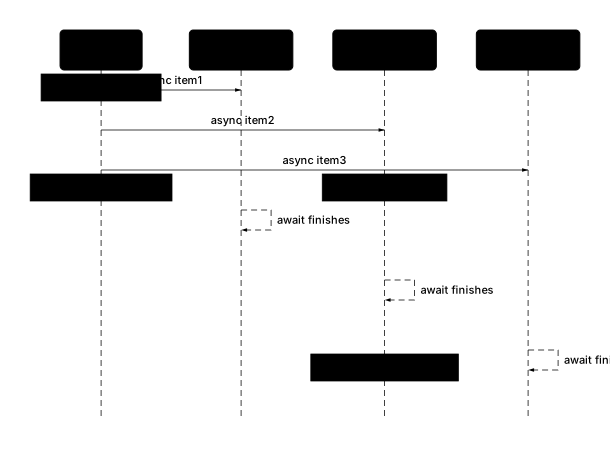
// BUG: forEach doesn't wait for async callbacks
items.forEach(async (item) => {
  await processItem(item);  // These fire but...
});
console.log('Done!');  // ...this runs immediately!
Why it fails: forEach returns undefined, not a Promise. The async callbacks execute, but nothing awaits them.
Fixes
Sequential (for...of):
for (const item of items) {
  await processItem(item);
}
console.log('Done!');  // Runs after all items processed
Parallel (map + Promise.all):
await Promise.all(items.map(item => processItem(item)));
console.log('Done!');  // Runs after all items processed
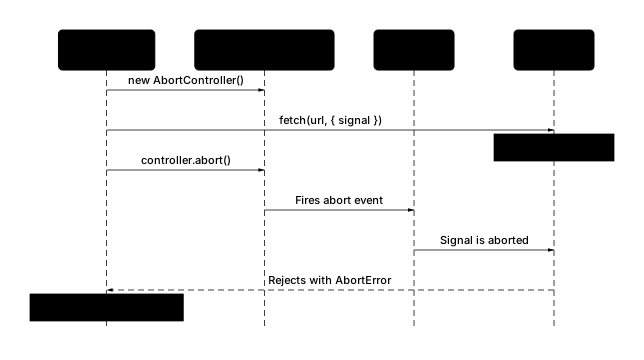
Modern fetch supports cancellation via AbortController:
const controller = new AbortController();

// Start the request
const fetchPromise = fetch('/api/data', {
  signal: controller.signal
});

// Cancel after 5 seconds
const timeoutId = setTimeout(() => controller.abort(), 5000);

try {
  const response = await fetchPromise;
  clearTimeout(timeoutId);
  return response.json();
} catch (err) {
  if (err.name === 'AbortError') {
    console.log('Request was cancelled');
  } else {
    throw err;
  }
}
Common patterns:
- Cancel on component unmount (React useEffect cleanup)
- Cancel on user navigation
- Cancel superseded requests (new search query cancels old one)
The event-driven nature of async code shares principles with the Observer design pattern, where subscribers react to events they've registered interest in.
When a Promise rejects and nothing catches it:
async function oops() {
  throw new Error('Something broke');
}

oops();  // No await, no .catch()
// UnhandledPromiseRejection warning!
In Node.js: Unhandled rejections crash the process in Node 15+.
In browsers: Logged to console, may break application state silently.
Fix: Always handle rejections. For a deeper look at error handling patterns across languages, see the Python vs JavaScript error handling comparison.
// Option 1: await + try/catch
try {
  await oops();
} catch (err) {
  handleError(err);
}

// Option 2: .catch()
oops().catch(handleError);
// BUG: Error bypasses the catch block!
async function fetchData() {
  try {
    return fetch('/api/data');  // Returns pending Promise
  } catch (err) {
    return fallback;  // Never runs on fetch error!
  }
}

// CORRECT: await ensures error is caught locally
async function fetchData() {
  try {
    return await fetch('/api/data');  // Awaits before returning
  } catch (err) {
    return fallback;  // Runs on fetch error
  }
}
Why it happens: return fetch() returns a pending Promise immediately, before it can reject. The catch block only catches errors that happen synchronously within the try.
The rule: Inside a try block, always return await if you want the catch to handle the rejection.
Note: Outside of try/catch, return await is redundant and ESLint's no-return-await rule will flag it. But inside try/catch, it's required.
| Pattern | Code |
|---|---|
| Basic async | async function f() { return await x(); } |
| Parallel | await Promise.all([a(), b()]) |
| Sequential | for (const x of items) await process(x) |
| Timeout | Promise.race([fetch(url), timeout(5000)]) |
| Cancel | controller.abort() with signal option |
| Partial success | Promise.allSettled([...]) |
When to Use JavaScript Async/Await
- Fetching data from APIs, databases, or files.
- Running independent async work in parallel with Promise.all.
- Handling partial failures with Promise.allSettled (don't fail-fast).
- Racing multiple sources or implementing timeouts with Promise.race.
- Canceling in-flight work (e.g., user navigates away) with AbortController.
Check Your Understanding: JavaScript Async/Await
Fetch user and posts in parallel. Allow posts to fail without failing the whole request.
Use Promise.allSettled to avoid fail-fast, then check each result's status property. Handle rejected results separately while using fulfilled values normally.
What You'll Practice: JavaScript Async/Await
Common JavaScript Async/Await Pitfalls
- Forgetting to await (leaking Promise { <pending> } upward)
- Using await outside an async function
- Sequential awaits in loops when parallel is possible
- Using forEach with async callbacks (forEach ignores the returned promises)
- Promise.all fail-fast surprising you (use allSettled if partial success is OK)
- Unhandled promise rejections (Node warns, browser logs, both can crash)
- Swallowing errors by catching without re-throwing or surfacing
- Forgetting that async functions always return a Promise (even when returning a value)
- Using return instead of return await inside try/catch (error bypasses the catch block)
JavaScript Async/Await FAQ
Why am I seeing Promise { <pending> } instead of data?
You forgot to await. An async function returns a Promise, so without await you get the Promise object, not its resolved value. Add await before the function call.
Where can I use await?
Only inside an async function, or at the top level of an ES module. Using await outside these contexts causes a syntax error.
Should I await inside a loop?
Only if you need strict sequential execution. If iterations are independent, build an array of promises and use Promise.all (or allSettled) for parallelism.
Why doesn't await work with Array.forEach?
forEach returns undefined, so there's nothing to await. The async callbacks fire but forEach doesn't wait for them. Use for...of for sequential, or map + Promise.all for parallel.
Promise.all vs Promise.allSettled: which should I use?
Promise.all is fail-fast: one rejection rejects the entire result. allSettled waits for every promise and returns each outcome with status: "fulfilled" or "rejected". Use allSettled when partial success is acceptable.
How do I handle async errors properly?
Wrap await in try/catch, or attach .catch() to the promise. Watch for "unhandled rejection" warnings: they mean a rejection went uncaught.
How do I cancel a fetch request?
Create an AbortController, pass its signal to fetch, then call controller.abort(). The fetch rejects with an AbortError.
What is Promise.race useful for?
Race returns whichever promise settles first. Useful for timeouts ("fetch or timeout after 5s") or "first response wins" patterns.
What about Promise.any?
Promise.any returns the first fulfilled promise, ignoring rejections. If all reject, it throws AggregateError containing all the rejection reasons.
Why did my try/catch not catch the error?
If you used return instead of return await, the Promise was returned before it rejected. Inside try/catch, always use return await so the catch block can handle rejections.
JavaScript Async/Await Syntax Quick Reference
async function fetchJson(url) {
  const res = await fetch(url);
  if (!res.ok) throw new Error(`HTTP ${res.status}`);
  return res.json();
}const fetchData = async (id) => {
const res = await fetch(`/api/items/${id}`);
return res.json();
};const [user, posts] = await Promise.all([
fetchUser(id),
fetchPosts(id)
]);const results = await Promise.allSettled([
fetchUser(),
fetchPosts()
]);
const [userR, postsR] = results;
if (userR.status === "rejected") throw userR.reason;
const posts = postsR.status === "fulfilled" ? postsR.value : [];try {
const data = await fetchData();
process(data);
} catch (err) {
console.error("Request failed:", err);
}const controller = new AbortController();
const res = fetch(url, { signal: controller.signal });
// Later: cancel the request
controller.abort();const timeout = (ms) => new Promise((_, reject) =>
setTimeout(() => reject(new Error("Timeout")), ms)
);
const data = await Promise.race([
fetchData(),
timeout(5000)
]);for (const url of urls) {
const data = await fetch(url);
await processData(data);
}const results = await Promise.all(
urls.map(url => fetch(url).then(r => r.json()))
);for await (const chunk of readableStream) {
process(chunk);
}JavaScript Async/Await Sample Exercises
Handle promise `p` error by logging the error.
p.catch(error => console.error(error));Wait for the first of `p1` or `p2` to settle (resolve/reject).
Promise.race([p1, p2])Chain `fetchData()`, then `parse`, then `save`, then catch `handleError`.
fetchData().then(parse).then(save).catch(handleError);+ 34 more exercises