Can you write this from memory?
Iterate over items and print each item
Python loops are iterator-based, not counter-based. That's the theory. In practice, you blank on enumerate's syntax, forget zip stops at the shortest iterable, and mix up range's arguments.
These exercises cover the patterns that trip people up: why range(5) gives you 0-4 (not 0-5), how enumerate(start=1) works, what zip(strict=True) does, and when for-else actually runs.
Quick reference:
range(stop)→ 0 to stop-1 (stop is excluded)enumerate(items, start=1)→ index starts at 1, not 0zip(a, b, strict=True)→ raises ValueError if lengths differfor...else→ else runs only if no break occurred
range(stop)             # 0, 1, 2, ..., stop-1
range(start, stop)      # start, start+1, ..., stop-1
range(start, stop, step) # start, start+step, ..., < stop
The key insight: stop is excluded. range(5) gives you 0, 1, 2, 3, 4—not 0 through 5.
| Call | Produces | Count |
|---|---|---|
range(5) | 0, 1, 2, 3, 4 | 5 elements |
range(1, 6) | 1, 2, 3, 4, 5 | 5 elements |
range(0, 10, 2) | 0, 2, 4, 6, 8 | 5 elements |
range(5, 0, -1) | 5, 4, 3, 2, 1 | 5 elements |
Why exclusive? So that range(n) produces exactly n values, and range(len(items)) gives valid indices for 0-based indexing.
Memory efficient: Unlike Python 2's range() which built a full list, Python 3's range() is a lazy sequence object that stores only start, stop, and step—a range(1_000_000) uses just 48 bytes regardless of size. It also supports O(1) membership testing: 999_999 in range(1_000_000) is instant because range checks mathematically rather than iterating. For a printable reference of loop patterns, see the Python loops cheat sheet.
Making range inclusive
If you need the stop value included, add 1:
# Include 10 in the range
for i in range(1, 10 + 1):  # 1 through 10
    print(i)
The _ convention: ignoring the loop variable
When you don't need the loop variable, use _ by convention:
# Run something 5 times, don't care about the index
for _ in range(5):
    do_something()
This signals to readers (and linters) that you're intentionally ignoring the value.
Instead of this anti-pattern:
# BAD: manual index tracking
i = 0
for item in items:
    print(f"{i}: {item}")
    i += 1
Use enumerate:
# GOOD: enumerate handles the index
for i, item in enumerate(items):
    print(f"{i}: {item}")
How it works: enumerate() yields tuples like (0, 'apple'), (1, 'banana'). Python's tuple unpacking splits each tuple into separate variables i and item.
The start parameter
By default, enumerate starts at 0. For 1-based numbering (human-readable lists, line numbers), use start=:
names = ["Alice", "Bob", "Charlie"]

for num, name in enumerate(names, start=1):
    print(f"{num}. {name}")
# Output:
# 1. Alice
# 2. Bob
# 3. Charlie
You can start at any integer:
# Continue numbering from where you left off
for i, item in enumerate(batch2, start=len(batch1)):
    ...
zip() pairs up elements from multiple iterables:
names = ["Alice", "Bob"]
scores = [85, 92]

for name, score in zip(names, scores):
    print(f"{name}: {score}")
# Alice: 85
# Bob: 92
Like enumerate(), this uses tuple unpacking: zip() yields tuples like ('Alice', 85), and Python unpacks them into name and score.
The silent truncation problem
By default, zip stops at the shortest iterable—a design PEP 618 called out as a common source of hard-to-find bugs, which is why strict=True was added in Python 3.10:
names = ["Alice", "Bob", "Charlie"]
scores = [85, 92]  # Missing Charlie's score!

for name, score in zip(names, scores):
    print(f"{name}: {score}")
# Only prints Alice and Bob—Charlie is silently lost!
This is a common source of data-loss bugs after refactoring.
zip(strict=True): catch length mismatches
Python 3.10+ added strict=True to raise an error if lengths differ:
for name, score in zip(names, scores, strict=True):
    print(f"{name}: {score}")
# ValueError: zip() argument 2 is shorter than argument 1
When to use strict=True:
- When mismatched lengths indicate a bug (parallel data that should align)
- Data pipelines where silent truncation would corrupt results
- Any time you're zipping data that must be the same length
Note: The error is raised when iteration reaches the mismatch, not at the start. This is because iterables might be lazy.
zip with more than two iterables
for a, b, c in zip(list1, list2, list3):
    process(a, b, c)
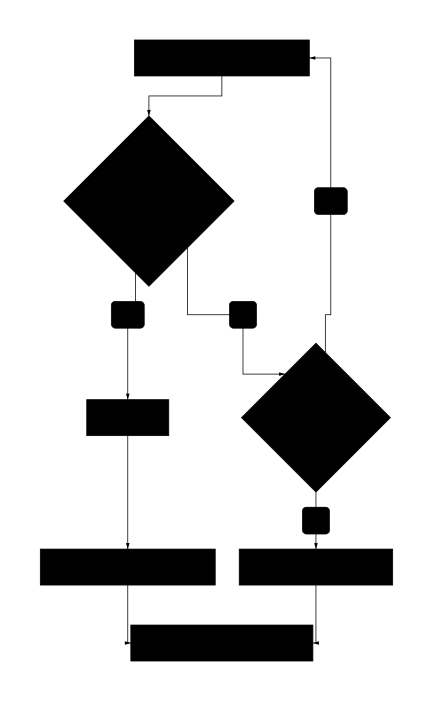
Python's for-else is unusual and has no equivalent in most other languages. If you work across languages, Python vs JavaScript loops compared covers this and other key differences. The else block runs only if the loop completed without breaking.
for item in items:
    if matches(item):
        print("Found it!")
        break
else:
    print("Not found")  # Only runs if no break occurred
Think of it as "no-break else"—if break never executed, else runs.
When for-else is useful
The classic use case is searching:
# Find first prime factor
for i in range(2, n):
    if n % i == 0:
        print(f"Smallest factor: {i}")
        break
else:
    print(f"{n} is prime")  # No factors found
Without for-else, you'd need a flag variable:
# Without for-else (more verbose)
found = False
for i in range(2, n):
    if n % i == 0:
        print(f"Smallest factor: {i}")
        found = True
        break
if not found:
    print(f"{n} is prime")
What skips the else block?
break→ else is skippedreturn→ function exits, else is skipped- Raised exception → else is skipped
- Normal completion → else runs
while-else works the same way
while condition:
    if found:
        break
else:
    print("Loop completed without break")
Keys and values together
config = {"host": "localhost", "port": 8080}

for key, value in config.items():
    print(f"{key} = {value}")
Just keys (the default)
for key in config:  # Same as config.keys()
    print(key)
Just values
for value in config.values():
    print(value)
With enumerate
for i, (key, value) in enumerate(config.items()):
    print(f"{i}: {key} = {value}")
break: exit the loop entirely
for item in items:
    if done_processing(item):
        break  # Exit loop immediately
    process(item)
# Execution continues here after break
continue: skip to next iteration
for item in items:
    if should_skip(item):
        continue  # Skip rest of this iteration
    process(item)  # This line is skipped when continue runs
pass: placeholder for empty loops
pass does nothing—use it when you need a syntactically valid but empty loop body:
# Placeholder while developing
for item in items:
    pass  # TODO: implement later

# Intentionally empty (rare but valid)
while not ready():
    pass  # Busy-wait

In nested loops
break and continue only affect the innermost loop:
for row in matrix:
    for cell in row:
        if cell == target:
            break  # Only breaks inner loop!
    # Outer loop continues
Rust's ownership model handles loop iteration very differently from Python's reference-based approach — see Python vs Rust loops for a side-by-side comparison. To break out of nested loops, use a flag or extract to a function:
def find_in_matrix(matrix, target):
    for row in matrix:
        for cell in row:
            if cell == target:
                return cell  # Exits entire function
    return None
Use while when you don't know how many iterations you need:
# Retry with backoff
attempts = 0
while attempts < max_retries:
    result = try_operation()
    if result:
        break
    attempts += 1
    time.sleep(2 ** attempts)
Common while patterns
Sentinel value:
while True:
    line = input("> ")
    if line == "quit":
        break
    process(line)
Condition-based:
while queue:
    item = queue.pop()
    process(item)
Infinite loop trap
The classic while mistake is forgetting to update the condition:
# BUG: infinite loop!
i = 0
while i < 10:
    print(i)
    # Forgot i += 1!

# FIX: always update the condition variable
i = 0
while i < 10:
    print(i)
    i += 1
Loop with index (prefer enumerate)
# BAD: manual indexing
for i in range(len(items)):
    print(i, items[i])

# GOOD: enumerate
for i, item in enumerate(items):
    print(i, item)
Iterate in sorted order
for item in sorted(items):
    print(item)  # Ascending order

for item in sorted(items, reverse=True):
    print(item)  # Descending order

for item in sorted(items, key=len):
    print(item)  # By length
Iterate in reverse
for item in reversed(items):
    print(item)

# With index (counting down)
for i in range(len(items) - 1, -1, -1):
    print(i, items[i])
Iterate with lookahead (pairwise)
# Compare adjacent items
for i in range(len(items) - 1):
    current, next_item = items[i], items[i + 1]
    if current > next_item:
        print("Decrease at", i)

# Python 3.10+: itertools.pairwise
from itertools import pairwise
for current, next_item in pairwise(items):
    ...
When to Use Python Loops: range(), enumerate(), zip(), break/continue, for-else
- You need to process every item in a list, dict, or string.
- You need to iterate with an index via enumerate().
- You want to iterate multiple sequences in parallel with zip().
- You need to detect "not found" after a search loop (for-else).
- You're looping a specific number of times with range().
Check Your Understanding: Python Loops: range(), enumerate(), zip(), break/continue, for-else
Print each item with its 1-based index from a list of names.
Use enumerate(names, start=1) to get (i, name) pairs starting at 1. It avoids manual index tracking and is idiomatic Python.
What You'll Practice: Python Loops: range(), enumerate(), zip(), break/continue, for-else
Common Python Loops: range(), enumerate(), zip(), break/continue, for-else Pitfalls
- Off-by-one errors with range(): stop is excluded, not included
- Forgetting enumerate(start=1) when you need 1-based indexing
- zip() silently truncating when iterables have different lengths—use strict=True
- Misunderstanding for-else: else runs on normal completion, not when condition is false
- Infinite while loops from forgetting to increment/update the condition
- Modifying a list while iterating (see collections page for safe patterns)
Python Loops: range(), enumerate(), zip(), break/continue, for-else FAQ
Why does range() not include the stop value?
range(n) produces exactly n values (0 through n-1), which matches 0-based indexing and len(). This makes range(len(items)) iterate over valid indices. To include stop, add 1: range(start, stop+1).
How do I start enumerate at 1 instead of 0?
Pass the start parameter: enumerate(items, start=1). The default is 0. You can use any integer, including negative numbers.
What does zip(strict=True) do?
Added in Python 3.10, strict=True raises a ValueError if the iterables have different lengths. Without it, zip silently truncates to the shortest—a common source of data-loss bugs.
What does for-else mean in Python?
The else block runs only if the loop completes normally—i.e., no break occurred. Think of it as "no-break else". It's useful for search patterns where you need to handle "not found".
When should I use a while loop instead of for?
Use while when the stopping condition is not tied to a collection—such as polling, retries, or reading until EOF. Use for when iterating over a known sequence.
Does return or raise skip the for-else block?
Yes. The else clause only runs if the loop finishes all iterations naturally. break, return, and raised exceptions all skip it.
How do I iterate over a dict with keys and values?
Use for k, v in d.items(): to get key-value pairs. For just keys: for k in d: (or d.keys()). For just values: for v in d.values().
How do I iterate with index AND value?
Use enumerate(): for i, item in enumerate(items). Don't use range(len(items)) and index manually—enumerate is clearer and less error-prone.
What happens if I modify a list while iterating over it?
You'll get unexpected behavior—items can be skipped or processed twice. Iterate over a copy (items[:]) or build a new list with a comprehension. See the collections page for safe patterns.
How do continue and break differ?
break exits the loop entirely. continue skips the rest of the current iteration and moves to the next. Both work in for and while loops.
What does underscore (_) mean in a for loop?
Using _ as the loop variable signals you don't need the value: for _ in range(5): do_something(). It's a convention that tells readers (and linters) you're intentionally ignoring it.
Is range() memory efficient in Python 3?
Yes. Python 3's range() is lazy—it generates values on demand instead of building a list. range(1_000_000) uses almost no memory. This was called xrange() in Python 2.
Python Loops: range(), enumerate(), zip(), break/continue, for-else Syntax Quick Reference
for i in range(5):      # 0, 1, 2, 3, 4
for i in range(1, 6):   # 1, 2, 3, 4, 5
for i in range(0, 10, 2): # 0, 2, 4, 6, 8for i, item in enumerate(items):
print(f"{i}: {item}")for num, name in enumerate(names, start=1):
print(f"{num}. {name}") # 1-basedfor a, b in zip(list1, list2):
print(a, b)for a, b in zip(xs, ys, strict=True):
# Raises ValueError if lengths differ
process(a, b)for key, value in my_dict.items():
print(f"{key} = {value}")for item in items:
if matches(item):
result = item
break
else:
result = None # Not foundwhile True:
data = fetch()
if data is None:
break
process(data)for item in items:
if should_skip(item):
continue
process(item)for _ in range(3):
print("Hello") # Runs 3 timesfor name in sorted(names):
print(name) # AlphabeticalPython Loops: range(), enumerate(), zip(), break/continue, for-else Sample Exercises
Iterate over characters in a string called item_name and print each character
for char in item_name:
print(char)Write the while loop header that runs while is_running is True
while is_running:Write a while loop header that runs while item_count is less than max_items
while item_count < max_items:+ 67 more exercises
Copy-ready syntax examples for quick lookup