Facade Pattern in Godot 4 GDScript: Taming "End Turn" Spaghetti
Learn the Facade pattern in Godot 4 (GDScript) with a practical end-turn refactor: ordering, side effects, UI wiring, and pitfalls.
A practical guide to using Facade correctly in game architecture. What it is, what it isn't, and when you actually need it.
What you'll learn:
- How to refactor an "End Turn" chain into a single operation
- How to return a summary without leaking subsystems
- How to wire UI without coupling everything together
- How to avoid God Object facades
The "End Turn" button problem
If you've built turn-based systems, you've written this function:
# The 50-line end_turn() that haunts your codebase
func _on_end_turn_button_pressed():
    _training.process_completions()        # Must happen first!
    _cooldowns.tick_all()                  # After training completes
    var income := _economy.calculate_turn_income()
    _ranch.add_gold(income)                # Needs income calculated first
    _autonomous.process_turn()             # Monsters roaming / chores
    _quests.tick_expirations()
    _quests.generate_if_needed()           # After old ones expire
    _calendar.advance()                    # Before event check
    _random_events.check_and_process()     # Needs updated turn number
# TODO: emit something? what data? who's listening?- Order matters (training before cooldowns, income before spending)
- Every caller must know the sequence
- Forgetting one step causes silent bugs
- Adding a new system means updating every call site
- Testing requires mocking 8+ systems
This is where Facade actually helps.
What is the Facade pattern?
The Gang of Four defined Facade as providing "a unified interface to a set of interfaces in a subsystem" (Design Patterns, 1994). Put simply: a dashboard that hides the wiring.
Facade handles multi-step workflows where ordering matters. You might also hear "application service" or "transaction script" in other contexts. The difference is mostly terminology: Facade emphasizes simplifying access, while Application Service emphasizes use-case orchestration. In practice, teams often use these interchangeably.
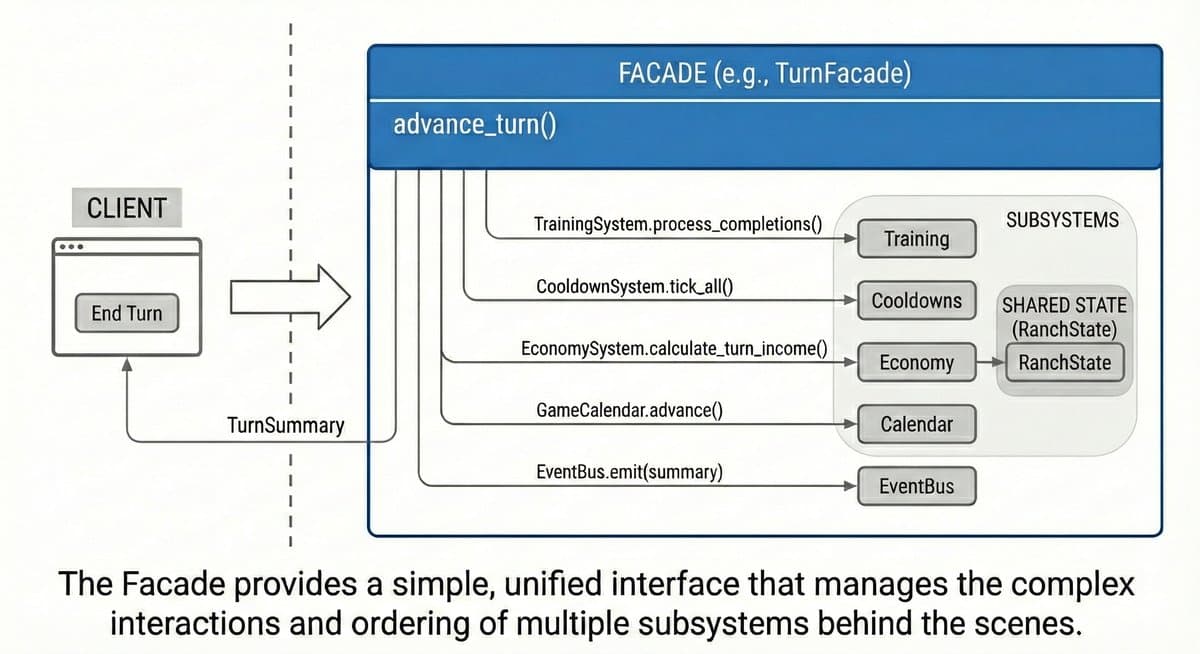
Facade doesn't forbid direct subsystem access. You can still call individual systems when you need fine-grained control. Facade is the convenient common path, not a jail.
The "Middle Man" smell
A lot of developers think they're using Facade when they write this:
# This is usually NOT what people mean by Facade
class_name MonsterFacade
extends RefCounted

var _monster_manager: MonsterManager

func get_monster(id: String) -> MonsterData:
    return _monster_manager.get_monster(id)  # Just forwarding

func get_level(id: String) -> int:
    return _monster_manager.get_level(id)  # Just forwarding

func add_xp(id: String, amount: int) -> void:
    _monster_manager.add_xp(id, amount)    # Just forwarding
This is the Middle Man smell: a class that mostly delegates with little added value.
Thin wrappers aren't always bad, though. A wrapper is useful if it enforces an invariant (e.g., "you can't add XP if the monster is fainted"), validates inputs, stabilizes a volatile API, or adds instrumentation. Some patterns are supposed to be middle-men (Proxy, Decorator), so don't reflexively delete them.
The test: if your wrapper doesn't simplify a use case, stabilize a boundary, or enforce invariants, it's probably just ceremony.
The real Facade: coordination, not wrapping
A Facade coordinates multiple subsystems into a single operation that means something to the domain. In game dev you'll also see this called a Use Case, Transaction Script, or simply TurnCoordinator — the boundaries blur, and the name matters less than the structure.
First, let's define the data structures. Use RefCounted for lightweight runtime-only summaries; use Resource if you need to save them to disk. Initialize fields with defaults so callers don't hit nulls:
# TurnSummary.gd — runtime-only summary of what happened this turn
class_name TurnSummary
extends RefCounted

var turn_number: int = 0
var gold_income: int = 0
var training_completed: Array[TrainingResult] = []
var cooldowns_expired: Array[String] = []
var autonomous_events: Array[AutonomousEvent] = []
var random_event: RandomEvent = null  # null if none triggered
Now the EventBus so the signals aren't magic:
# EventBus.gd (Autoload singleton)
extends Node

signal turn_advanced(summary: TurnSummary)
signal monster_adopted(monster: MonsterData)
signal battle_completed(result: BattleResult)
EventBus is a deliberate global for cross-cutting events (analytics, achievements, audio). Don't make every dependency an autoload though. We inject the subsystems so they're mockable in tests.
Now the Facade:
class_name TurnFacade
extends RefCounted
## Handles end-of-turn processing.
## One call. Eight systems. Order guaranteed.
##
## IMPORTANT: This facade holds references to scene-tree nodes.
## Only use it while those nodes are alive (i.e., while GameRoot exists).

var _calendar: GameCalendar
var _training: TrainingSystem
var _cooldowns: CooldownSystem
var _economy: EconomySystem
var _ranch: RanchState
var _autonomous: AutonomousSystem
var _quests: QuestSystem
var _random_events: RandomEventSystem


func _init(
    calendar: GameCalendar,
    training: TrainingSystem,
    cooldowns: CooldownSystem,
    economy: EconomySystem,
    ranch: RanchState,
    autonomous: AutonomousSystem,
    quests: QuestSystem,
    random_events: RandomEventSystem
) -> void:
    _calendar = calendar
    _training = training
    _cooldowns = cooldowns
    _economy = economy
    _ranch = ranch
    _autonomous = autonomous
    _quests = quests
    _random_events = random_events


## THE FACADE METHOD — this is what Facade is about
func advance_turn() -> TurnSummary:
    var summary := TurnSummary.new()

    # 1. Complete training (MUST happen before cooldowns)
    summary.training_completed = _training.process_completions()

    # 2. Tick cooldowns (monsters become available)
    summary.cooldowns_expired = _cooldowns.tick_all()

    # 3. Calculate and apply income
    summary.gold_income = _economy.calculate_turn_income()
    _ranch.add_gold(summary.gold_income)

    # 4. Process autonomous monster actions
    summary.autonomous_events = _autonomous.process_turn()

    # 5. Refresh quest board
    _quests.tick_expirations()
    _quests.generate_if_needed()

    # 6. Advance calendar FIRST, then read turn number
    _calendar.advance()
    summary.turn_number = _calendar.current_turn

    # 7. Check random events
    summary.random_event = _random_events.check_and_process()

    # 8. Notify decoupled listeners (analytics, achievements, audio)
    EventBus.turn_advanced.emit(summary)

    return summary
Notice that advance_turn() both returns the summary and emits a signal. Use them for different purposes:
- Return value: for the immediate caller (HUD updates the display)
- Signal: for decoupled listeners that shouldn't be called directly (analytics, achievements, ambient audio)
Don't have the HUD listen to the signal and use the return value for the same data. Pick one.
Construction and UI wiring (composition root). We pass dependencies via the constructor instead of using Autoloads so we can swap in mocks during testing:
# GameRoot.gd — where subsystems are created and wired together
extends Node

var _turn_facade: TurnFacade

func _ready() -> void:
    _turn_facade = TurnFacade.new(
        $Calendar,
        $TrainingSystem,
        $CooldownSystem,
        $EconomySystem,
        $RanchState,
        $AutonomousSystem,
        $QuestSystem,
        $RandomEventSystem
    )

    # Pass the facade to HUD. Let HUD handle its own button wiring.
    $UI/HUD.initialize(_turn_facade)
HUD owns its own connections:
# HUD.gd
extends Control

var _turn_facade: TurnFacade

func initialize(facade: TurnFacade) -> void:
    _turn_facade = facade
    # HUD wires its own button — GameRoot doesn't need to know the method name
    # Note: %EndTurnButton requires the node be marked "Unique Name" in Scene.
    # Otherwise use $EndTurnButton or an @onready var reference.
    %EndTurnButton.pressed.connect(_on_end_turn_pressed)

func _on_end_turn_pressed() -> void:
    var result := _turn_facade.advance_turn()
    _show_turn_summary(result)
The HUD calls the Facade and gets back the summary to display. GameRoot doesn't know about HUD's internal methods. Clean, linear flow.
Another example: monster adoption
class_name AdoptionFacade
extends RefCounted
## Handles monster adoption: validation, payment, assignment, side effects.

var _monster_factory: MonsterFactory
var _cost_calculator: CostCalculator
var _ranch: RanchState
var _roster: MonsterRoster
var _tutorial: TutorialTracker
var _achievements: AchievementSystem
var _analytics: AnalyticsService


func _init(
    monster_factory: MonsterFactory,
    cost_calculator: CostCalculator,
    ranch: RanchState,
    roster: MonsterRoster,
    tutorial: TutorialTracker,
    achievements: AchievementSystem,
    analytics: AnalyticsService
) -> void:
    _monster_factory = monster_factory
    _cost_calculator = cost_calculator
    _ranch = ranch
    _roster = roster
    _tutorial = tutorial
    _achievements = achievements
    _analytics = analytics


func adopt_monster(species: String, target_slot: int) -> AdoptionResult:
    # Validate
    var monster := _monster_factory.create(species)
    if not monster:
        return AdoptionResult.failed("Unknown species")

    var cost := _cost_calculator.adoption_cost(monster)
    if not _ranch.can_afford(cost):
        return AdoptionResult.failed("Not enough gold: need %d" % cost)

    if not _roster.is_slot_available(target_slot):
        return AdoptionResult.failed("Slot occupied")

    # Execute (validate-then-execute to avoid partial state in normal flows)
    # For true atomicity, wrap mutations in a transaction or add explicit rollback.
    _ranch.spend_gold(cost)
    _roster.assign_to_slot(monster, target_slot)

    # Side effects (caller shouldn't need to know about these)
    _tutorial.mark_completed("first_monster")
    _achievements.check_progress("menagerie", _roster.total_count())
    _analytics.track("monster_adopted", {"species": species})
    EventBus.monster_adopted.emit(monster)

return AdoptionResult.success(monster)- Combines 7 systems into one operation
- Validates before executing (no partial state)
- Handles side effects the caller shouldn't know about
- Returns a result object the caller can act on
Here's the real win: refactoring safety. Next month, when you rewrite TrainingSystem to use a different algorithm, you only update the Facade. The UI calling facade.advance_turn() doesn't change at all.
Don't return raw subsystem objects from your Facade. If advance_turn() returned an EconomySystem node, you've broken the seal. Return data structs (Resource, RefCounted, or plain Dictionary) instead.
When Facade helps
| Scenario | Why |
|---|---|
| Multi-step operations | Guarantees all steps happen |
| Required ordering | Enforces A-before-B dependencies |
| Cross-cutting side effects | Analytics, achievements, tutorials hidden from caller |
| Transaction-like operations | Validate-then-execute pattern |
| Legacy system integration | Hide ugly internals behind a clean API |
When to skip Facade
These are rules of thumb, not absolutes:
| Scenario | Why |
|---|---|
| Single-system access | Adds indirection without coordination value |
| Granular control needed | If callers need to call steps individually, Facade hides too much |
| Hot paths | Avoid facades if they tempt you into hidden work inside _process() |
| Simple CRUD | get_item(id) rarely needs a Facade |
Facades work best for writes (adopting monsters, ending turns, saving games). For frequently-called reads, consider direct access or cached references. Measure if you're unsure.
The God Object trap
A common failure mode: the Facade grows to 1000+ lines because "it coordinates everything."
The symptom:
# GameFacade.gd — 2000 lines, touching every system
func advance_turn() -> TurnSummary: pass
func adopt_monster() -> AdoptionResult: pass
func start_battle() -> BattleResult: pass
func save_game() -> SaveResult: pass
func load_game() -> LoadResult: pass
func craft_item() -> CraftResult: pass
# ... 50 more methods
The fix: Split by domain, not one mega-Facade:
TurnFacade        — Turn advancement
AdoptionFacade    — Monster acquisition
BattleFacade      — Combat
PersistenceFacade — Save/load
CraftingFacade    — Item creation
Each Facade stays focused. Each is independently testable.
Because TurnFacade is a RefCounted with dependencies passed in _init(), you can unit test it with GUT or GdUnit4. Pass in mock systems and assert that process_completions() was called before tick_all(). No scene tree required.
Code template
class_name [Domain]Facade
extends RefCounted
## [Domain]Facade — Handles [operation description].
##
## Single entry point for [what it coordinates].
## Guarantees [ordering/validation/side effects].

var _system_a: SystemA
var _system_b: SystemB
var _system_c: SystemC


func _init(system_a: SystemA, system_b: SystemB, system_c: SystemC) -> void:
    _system_a = system_a
    _system_b = system_b
    _system_c = system_c


## Primary operation — the reason this Facade exists
func do_the_thing(params: Params) -> Result:
    # 1. Validate preconditions
    if not _can_proceed(params):
        return Result.failed("reason")

    # 2. Execute in correct order
    var step1 := _system_a.do_first()
    var step2 := _system_b.do_second(step1)
    _system_c.do_third(step2)

    # 3. Handle side effects
    _emit_events()
    _track_analytics()

    # 4. Return result
    var summary := _build_summary(step1, step2)
    return Result.success(summary)
Implementation checklist
- Does it coordinate multiple systems? If not, you might just need direct access.
- Does order matter? Document the sequence in comments.
- Return result objects, not void. Callers need to know what happened.
- Use typed constructor arguments for dependencies (better than untyped dictionaries).
- Keep it focused. One domain per Facade.
- Measure before optimizing. Don't assume Facade overhead matters.
Common misconceptions
| Misconception | Reality |
|---|---|
| "Facade is just a wrapper" | Wrappers isolate. Facades coordinate. But there's overlap. |
| "Facade fixes bad code" | It hides complexity behind a clean interface. Sometimes that's the right call. |
| "One Facade for the whole game" | That's a God Object. Split by domain. |
| "Every access should go through Facade" | Only for complex operations. Simple reads can be direct. |
| "Facade forbids direct subsystem access" | No. Facade is a convenience, not a restriction. |
FAQ
Is Facade the same as a Service Layer?
They overlap. In enterprise architecture, "Service Layer" or "Application Service" describes the same idea: coordinating use cases across multiple domain objects. Facade is the GoF term; Service Layer is the enterprise/DDD term. In game dev, call it whatever makes sense to your team.
Facade vs Mediator?
Facade simplifies access to a subsystem. Callers go through the Facade; subsystems don't know about it.
Mediator coordinates communication between objects that know about the Mediator. It's bidirectional.
If your "Facade" is receiving callbacks from subsystems and routing messages between them, it's probably a Mediator.
Should my Facade call UI?
No. Facades coordinate domain/application logic. UI observes results via return values or signals. If your Facade is calling _hud.show_message(), you've coupled it to presentation. Return data and let the UI decide how to display it.
Should I use Facade in _process()?
Probably not. _process() runs every frame. Keep that path simple and direct. Facades work well for discrete actions (end turn, adopt monster, save game), not per-frame updates.
How do I emit signals from an autoload EventBus in Godot 4?
# EventBus.gd (autoload)
extends Node

signal turn_advanced(summary: TurnSummary)
signal monster_adopted(monster: MonsterData)

# Usage elsewhere:
EventBus.turn_advanced.emit(my_summary)

# Connecting:
EventBus.turn_advanced.connect(_on_turn_advanced)
My Facade is getting huge. What do I do?
Split by domain. If GameFacade has methods for combat, inventory, saving, and adoption, break it into BattleFacade, InventoryFacade, PersistenceFacade, and AdoptionFacade. Each should have a clear, focused responsibility.
Summary
Facade is not:
- Just a wrapper that forwards calls
- A way to hide one class behind another
- An excuse to create God Objects
- A restriction on direct subsystem access
Facade is:
- Coordination of multiple subsystems
- Enforcement of required ordering
- An operation that means something to the domain
- A convenient common path for complex workflows
The test: If removing the Facade forces callers to understand sequencing and coordinate multiple systems themselves, you need the Facade. If they can call subsystems in any order with the same result, you probably don't.
Learning GDScript patterns? We have design-pattern flashcards (Facade, Observer, State Machine, and more) you can drill in 10 minutes a day.
References
- Gamma, E., Helm, R., Johnson, R., & Vlissides, J. (1994). Design Patterns: Elements of Reusable Object-Oriented Software. Addison-Wesley.
- Godot 4 GDScript Style Guide
- Godot 4 Signals Documentation